MailerLite Alternatives for B2B Nurturing (2026)
Move from MailerLite to ActiveCampaign when your nurture paths need CRM context and conditional steps, to Brevo when you want email, SMS and transactional mail on a single bill, and to Kit when your readers are subscribers to a paid newsletter, course or community. MailerLite is seldom the pricier tool: at 10,000 subscribers its Comfort plan is $89 a month billed monthly, against $149 for ActiveCampaign Starter billed annually. You are paying for different capabilities, not a better deal, so each pick below names the MailerLite gap it closes.
By Owen Hargrove · Updated 7 Oct 2026
TL;DR: the three moves worth considering
- Best pick for B2B nurture: ActiveCampaign. Starter is $15 and Plus $49 a month at 1,000 contacts on annual billing, with a CRM and conditional content in the feature list (ActiveCampaign pricing). Starter limits an automation to 5 actions, so budget for Plus.
- Best for one bill covering marketing and transactional mail: Brevo. Free at 300 emails a day, Starter from $9 and Standard from $18 a month (Brevo pricing).
- Best for creators and course sellers: Kit. Free to 10,000 subscribers for broadcasts; automations from Creator at $33 a month at 1,000 subscribers (Kit pricing).
- Stay on MailerLite if newsletters and short automations are the job and a list this size fits its Comfort or Power ladder.
Why people look past MailerLite
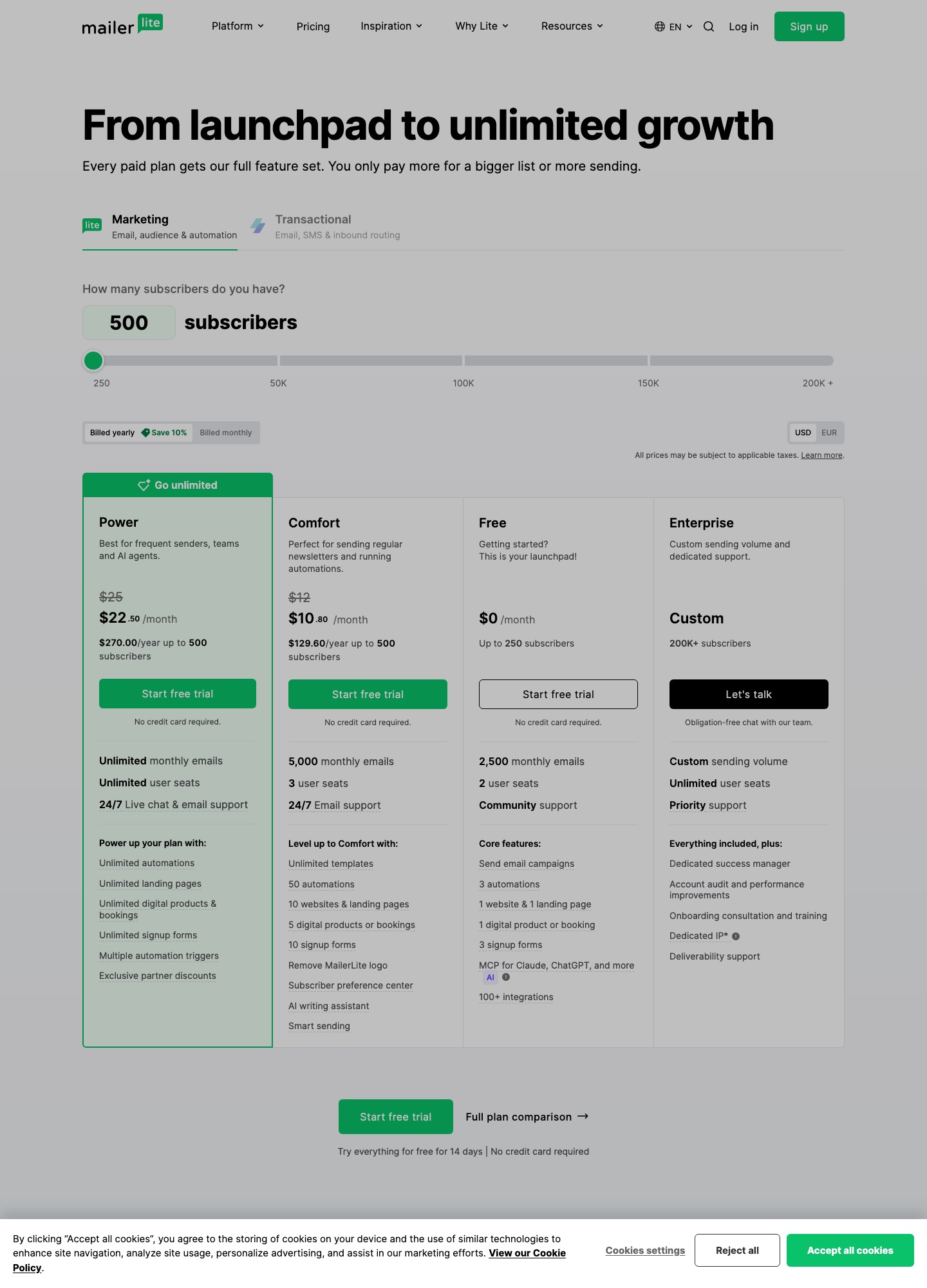
The plan ladder is clear on its pricing page, which helps explain where it stops. Free covers 250 subscribers, 2,500 emails a month, 2 user seats and 3 automations. Comfort gives 3 seats, 50 automations and a monthly email allowance of 10 times the ceiling of your subscriber tier (5,000 emails at the 500 tier). Power removes the email limit, the seat limit and the automation limit. Teams usually cross one of those lines before they cross a feature line.
Price grows with the subscriber count. On monthly billing Comfort reads $19 at 1,000 subscribers, $49 at 5,000, $89 at 10,000 and $179 at 25,000, and Power reads $39, $69, $129 and $239 at the same sizes. A yearly toggle on the page takes 10% off.
Two gaps matter for nurturing. First, transactional email sits in a separate product: the pricing page has a Transactional tab that is MailerSend, with its own plans. Second, the plan tables describe automations, landing pages, websites, digital products and signup forms, with no sales pipeline, deal stages or account records. If a handoff to a salesperson is part of your journey, that is where ActiveCampaign, HubSpot or Customer.io objects come in.
Source: mailerlite.com/pricing.
Which gap are you closing?
| Gap in MailerLite | Best destination | What the move costs you |
|---|---|---|
| Automation depth and CRM records | ActiveCampaign, HubSpot | Higher list-size pricing and more admin work |
| Transactional mail in the same account | Brevo, Mailchimp | Re-learning a plan structure based on sends |
| Triggers from product behavior | Customer.io, Loops | Engineering time for event tracking |
| Company-level journeys for B2B SaaS | Userlist, Customer.io | A price block built around 10,000 users |
| Subscriber-funded content business | Kit | Automations behind the paid plans |
| Store revenue attribution | Klaviyo, Mailchimp | Profile-based pricing and a heavier data model |
All 9 alternatives at a glance
| # | Alternative | Best for | Price on its pricing page | Trade-off against MailerLite |
|---|---|---|---|---|
| 1 | ActiveCampaign | Nurture with CRM and conditions | Starter $15, Plus $49, Pro $79 at 1,000 contacts, billed annually | Automation limits on Starter |
| 2 | Brevo | Email plus SMS plus transactional | Free; Starter from $9; Standard from $18 | Billing follows email volume |
| 3 | Kit | Creator and course audiences | Free to 10,000; Creator $33 at 1,000 subscribers | Automations need a paid plan |
| 4 | Mailchimp | Familiar tools and many integrations | Free to 250 contacts; Essentials $13, Standard $20 at 500 contacts | Costs jump by contact band |
| 5 | HubSpot | Sales and marketing in one CRM | Free tools; Starter $7; Professional $800 | Pro-level automation is costly |
| 6 | Customer.io | Product-event journeys | Essentials $100 at 5,000 profiles; $145 at 10,000 | Needs event instrumentation |
| 7 | Loops | SaaS lifecycle email | Free to 1,000 contacts; $99 at 9,998 subscribers | Fewer newsletter and website tools |
| 8 | Userlist | B2B SaaS with company data | Basic $149, Professional $349, up to 10,000 users | No small-list entry price |
| 9 | Klaviyo | Online stores | Free to 250 active profiles and 500 emails | Commerce-shaped; paid tiers on its page |
Cost at 1,000, 5,000 and 10,000 contacts
| Tool and plan | 1,000 | 5,000 | 10,000 |
|---|---|---|---|
| MailerLite Comfort (monthly billing) | $19 | $49 | $89 |
| MailerLite Power (monthly billing) | $39 | $69 | $129 |
| ActiveCampaign Starter (annual billing) | $15 | $79 | $149 |
| ActiveCampaign Plus (annual billing) | $49 | $145 | $189 |
| Kit Creator | $33 (billed yearly) | $75 | $116 |
| Mailchimp Standard | Starts at $20 for 500 contacts | $100 (band 2,501 to 5,000) | $135 (band 5,001 to 10,000) |
| Customer.io Essentials | Smallest shown: $100 at 5,000 profiles | $100 | $145 |
The arithmetic: at 5,000 subscribers MailerLite Power ($69) undercuts ActiveCampaign Plus ($145) by $76 a month, which is $912 a year. At 10,000 the same pair is $129 against $189, a $60 monthly gap or $720 a year. If MailerLite's 10% yearly discount applies, Power at 10,000 falls from $129 to $116.10 (10% off), so the difference to Plus shrinks a little. ActiveCampaign Starter at 5,000 is $79, but it keeps the 5-action ceiling per automation.
One Mailchimp detail changes the maths: the Standard bands on its pricing page show a first-year promotion (for instance $50 a month for 12 months at 2,501 to 5,000 contacts) followed by the list price of $100. Compare the second-year figure, not the headline. Sources: MailerLite, ActiveCampaign, Kit, Mailchimp, Customer.io.
1. ActiveCampaign — Best for CRM-backed nurture paths
Pricing: At 1,000 contacts on annual billing: Starter $15, Plus $49, Pro $79, Enterprise $145. At 5,000: $79, $145, $205, $375. At 10,000: $149, $189, $375, $589. Pricing page
Why switch from MailerLite: the feature list includes marketing automation, email campaigns, landing pages, conditional content and CRM integrations, and Pro adds advanced segmentation and three users. The send allowance is 10 times your contact limit on Starter and Plus, 12 times on Pro and 15 times on Enterprise, which is the same multiple as MailerLite Comfort. A DPA template is published.
What you lose: the low price per subscriber and the free plan. Starter caps an automation at 5 actions and allows one user, so most nurture programs need Plus.
Test first: rebuild your most complex MailerLite automation on a trial, count its steps, and choose the plan from that count.
2. Brevo — Best for email, SMS and transactional on one bill
Pricing: Free (300 emails/day, up to 100,000 contacts stored); Starter from $9/month; Standard from $18/month; Professional from $499/month for 150,000 to 10 million sends. Pricing page
Why switch from MailerLite: Brevo lists transactional email, SMS campaigns and WhatsApp campaigns inside the same account, which removes the second vendor MailerLite requires for receipts. Standard adds automation, A/B testing and advanced reports; the free plan allows marketing automation for up to 2,000 contacts. Brevo publishes a DPA, and its help center states a 10% discount for yearly billing.
What you lose: prices follow monthly email volume rather than subscriber count, which rewards large, lightly mailed lists and penalizes frequent sends. Its first Starter and Standard tiers store contacts for 500 people, so check the selector for your own size.
Test first: add up last month's sends from MailerLite campaigns and automations and see which Brevo tier that volume lands in.
3. Kit — Best for subscriber-funded content businesses
Pricing: Free up to 10,000 subscribers; Creator $33/month at 1,000 subscribers billed yearly ($390), $75 at 5,000, $116 at 10,000, $166 at 25,000; Pro $66 at 1,000 and $158 at 10,000. Pricing page
Why switch from MailerLite: Kit's free plan is larger (10,000 subscribers against 250), includes unlimited landing pages, forms, broadcasts, tagging and segmentation, and lets you sell digital products and subscriptions. Visual Automations and sequences are unlimited from Creator, and the pricing page offers free migrations plus a 14-day trial. At 25,000 subscribers its $166 undercuts MailerLite Comfort's $179 monthly price.
What you lose: Kit is organized around subscribers, tags and sequences, with lighter CRM and event depth. Automations are not free.
Test first: move one lead magnet and its welcome sequence, tag subscribers by source, and compare setup time with what you spent on MailerLite groups.
4. Mailchimp — Best for familiar tooling and broad integrations
Pricing: Free for 250 contacts and 500 sends a month (250 a day); at 0 to 500 contacts Essentials starts at $13, Standard at $20 and Premium at $350 a month; Standard $100 at 2,501 to 5,000 contacts, $135 at 5,001 to 10,000, $230 at 10,001 to 15,000. Pricing page
Why switch from MailerLite: Mailchimp's pricing page lists audience segmentation, marketing automation, custom-coded templates, A/B and multivariate testing, SMS marketing and transactional email, with integrations that include Shopify, WooCommerce, Salesforce and Zapier. Send allowances rise by plan: 10 times contacts on Essentials, 12 times on Standard, 15 times on Premium, with 3, 5 and unlimited seats.
What you lose: price per contact is higher than MailerLite at every size read here, and custom-coded templates can be created on Essentials but only sent from Standard.
Test first: price the plan at your list size one year from now, after promotional discounts end.
5. HubSpot — Best when sales and marketing share a CRM
Pricing: Free Marketing Hub tools; Starter $7/month; Professional $800/month; Enterprise $3,600/month. Pricing page
Why switch from MailerLite: contacts, companies and deals live in the same record as the emails they receive. Email automation reads one action on Free, up to ten on Starter, and unlimited plus omni-channel on Professional and Enterprise.
What you lose: a budget. Marketing Hub is priced per seat, and the step to Professional is $800 a month. Most teams meet the first limit, one automated action on Free and ten on Starter, long before they decide the price is worth paying.
Test first: import 500 contacts into the free CRM and see if your sales team actually opens it daily; adoption matters more than features. Also see HubSpot alternatives.
6. Customer.io — Best for journeys driven by product behavior
Pricing: Essentials from $100/month at 5,000 profiles; $145 at 10,000; $235 at 20,000; Premium from $1,000/month billed yearly. Pricing page
Why switch from MailerLite: if emails should depend on what a user did in your app rather than which group they sit in, Customer.io gives you a visual workflow builder, email, push, in-app messages and WhatsApp, with data centers in the US and EU and a published DPA.
What you lose: simplicity. The smallest size shown starts at 5,000 profiles for $100, which is hard to justify for a newsletter list.
Test first: pick one behavior, such as an unused feature after seven days, and prove you can send that event from your app. See Customer.io alternatives if the price puts you off.
7. Loops — Best for SaaS lifecycle email without extras
Pricing: Free up to 1,000 contacts (4,000 sends in a rolling 30 days); $99/month at 9,998 subscribers; $249 at 49,989; no seat fees. Pricing page
Why switch from MailerLite: Loops frames itself as the email platform for SaaS teams, with marketing, product and transactional email in one place, and includes transactional sends on paid plans at no extra charge. At 10,000 subscribers its $99 sits between MailerLite Comfort ($89) and Power ($129).
What you lose: websites, digital products and a wide set of newsletter tools. Loops is aimed at software companies.
Test first: send one onboarding email via its transactional endpoint, then decide whether to move automations. Related: Loops alternatives.
8. Userlist — Best for B2B SaaS with company-level data
Pricing: Basic $149/month and Professional $349/month for up to 10,000 users; $229 on Basic at 18,000 users and $369 at 32,000. Pricing page
Why switch from MailerLite: the plans list marketing and lifecycle email, in-app messages and segments for users and companies, so a trial can be judged by account rather than by individual inbox. Professional adds A/B split testing and conversion goals.
What you lose: money and newsletter tooling. At 10,000 users Basic at $149 is $20 above MailerLite Power at $129, and Professional at $349 is $220 above it.
Test first: send your trial-expiry reminder to the account owner only, and check that it can be expressed in the segment builder.
9. Klaviyo — Best for online stores
Pricing: Free plan for up to 250 active profiles and 500 emails a month; paid selector on its pricing page. Pricing page
Why switch from MailerLite: a business that earns most of its revenue from a store may want purchase events and catalog data driving every flow. For B2B nurturing that is not the typical case.
What you lose: a free tier that covers 2,500 emails (MailerLite) falls to 500 emails here, and the data model is oriented toward products and orders.
Test first: list the three revenue-generating flows you want and confirm each depends on a store event.
Leaving MailerLite: what exports and what you rebuild
| Item | How it leaves MailerLite |
|---|---|
| Subscribers | Account administrators can export from the Subscribers page as CSV (or CSV for Excel), choosing all, active, unconfirmed, unsubscribed, bounced or spam-complaint subscribers. Only the columns visible in your list are included (export guide). |
| Groups | Group names are not in the file by default. Open Set columns and add Groups first, or export each group on its own from the Groups tab. |
| Segments | Exportable one at a time from the Segments tab; the file lists whoever matches the rules at that moment, so recreate the rules in the new tool. |
| Automations | Not exportable as logic. From automation activity you can export those who completed it, who are queued and who were canceled; use the queued list to re-enroll people at the right step. |
| Suppressions | Export unsubscribed, bounced and complaint lists separately and load them as suppressed before anything is sent. |
| Notes | Subscriber notes cannot be exported. |
| Forms, landing pages, websites | Rebuild them; replace embedded forms on your site, and if you pointed a domain at MailerLite pages, change that record after the new pages are live. |
| Sending domain | Authenticate your domain with the new vendor (DKIM and SPF) before the first campaign, and keep the old records until MailerLite stops sending. |
Stay on MailerLite if…
- Your program is newsletters plus a handful of welcome or re-engagement automations, which Comfort's 50 automations covers easily.
- You need EU data storage: the pricing page states that storage is in the European Union and carries an ISO 27001 certificate.
- Price per subscriber matters most; in the cost table Comfort is the lowest figure at both 5,000 and 10,000 subscribers.
- No salesperson needs a record of what a lead received.
Verdict: ActiveCampaign for nurture, Brevo for budget, Kit for creators
If the reason you are reading is that nurture sequences need to branch and hand off to a salesperson, trial ActiveCampaign Plus, not Starter. If it is a mix of newsletters, SMS and receipts, Brevo is the cheapest way to consolidate. If the audience is paying subscribers or students, Kit is the natural next step. Everyone else gets more from staying and tidying their groups.
Keep reading: all alternatives · nurture tools for newsletters · drip campaigns · tools for small business · deliverability tips
Frequently asked questions
Is MailerLite good enough for B2B nurturing?
For short sequences triggered by a form or a group change, yes. Comfort includes 50 automations and Power removes the cap. What it does not list is a sales pipeline, deal records or account-level objects, which is where B2B programs usually need more.
Which MailerLite alternative has a free plan with automation?
Brevo's free plan permits marketing automation for up to 2,000 contacts. HubSpot's free tools allow one automated action. Kit's free plan covers broadcasts to 10,000 subscribers, but sequences start on Creator. MailerLite's own free plan includes 3 automations.
Can I move automations without rebuilding?
No. MailerLite exports subscriber data, not workflow logic. Export the queued subscribers from each automation's activity page, rebuild the workflow, and enroll that queue at the right step.
Does MailerLite send transactional email?
The Transactional tab on its pricing page belongs to MailerSend, a separate product with its own plans. That is the main reason teams that want receipts and newsletters in one place consider Brevo or Mailchimp.
How do I compare prices when billing terms differ?
Put every quote on the same basis. MailerLite's table above uses monthly billing, ActiveCampaign's figures are billed annually and Kit's 1,000-subscriber price is billed yearly. A like-for-like check means applying MailerLite's 10% yearly discount before comparing.