Customer.io vs Drip: Behavioral Email Automation Compared
Both react to what people do. Customer.io is a messaging platform you feed with your own product data; Drip is an ecommerce marketing tool that plugs into your store.
By Owen Hargrove · Updated 7 Oct 2026
Verdict by audience
Choose Customer.io if you run a software product and want messages triggered by what users do inside it. Essentials is listed from $100 a month at 5,000 profiles, billed monthly, with 1 million emails included (Customer.io pricing).
Choose Drip if you sell products online through Shopify, WooCommerce or BigCommerce and want abandoned-cart, welcome and win-back flows from the store's own data. Its slider starts at $39 a month for 1 to 2,500 people (Drip pricing).
If you have no product events and no store, neither is the right starting point. A B2B team nurturing leads toward sales should read ActiveCampaign vs HubSpot first.
What each vendor charges on 7 October 2026
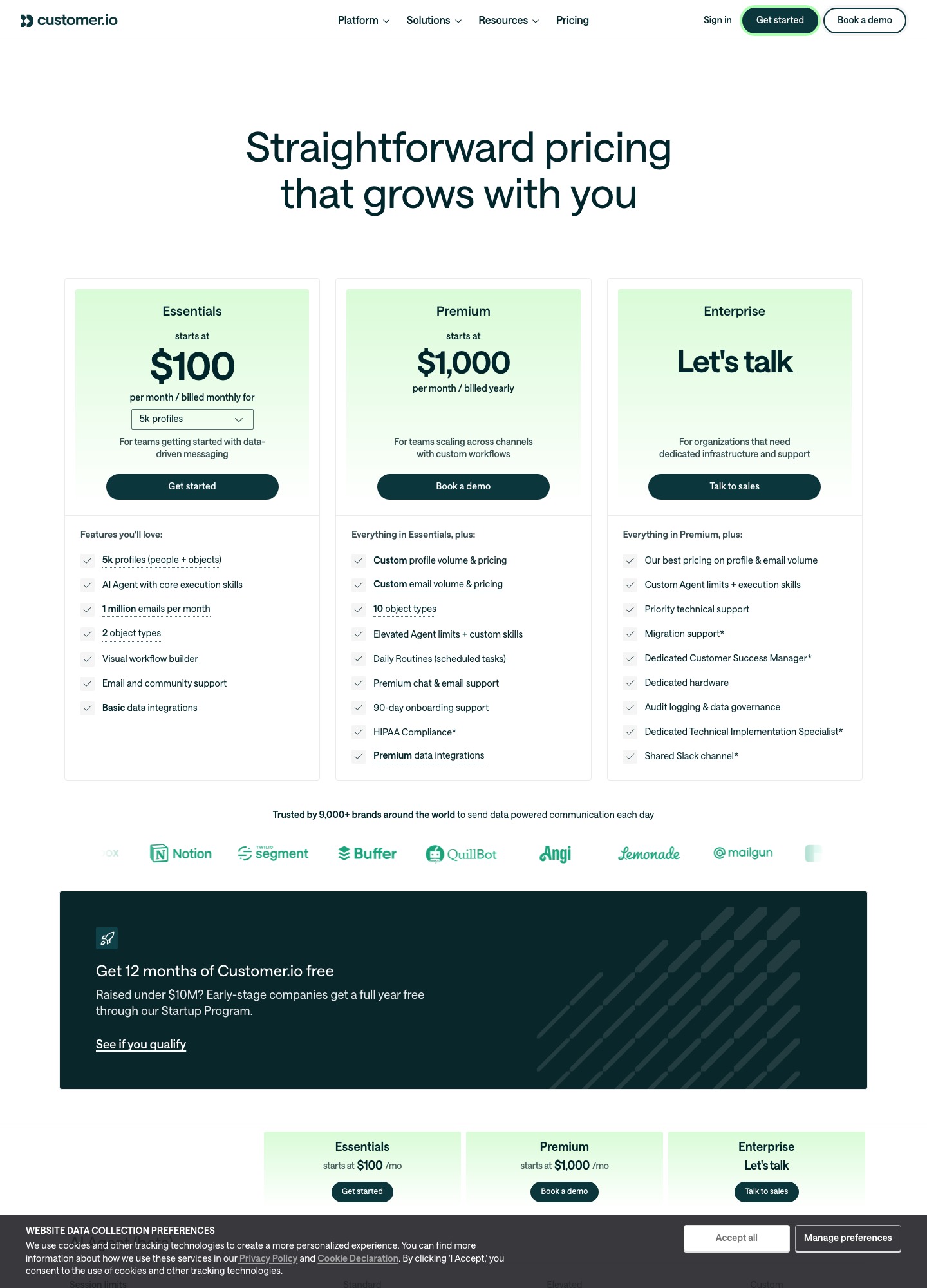
Customer.io lists Essentials from $100 a month billed monthly, Premium from $1,000 a month billed yearly, and an Enterprise tier by conversation. Essentials includes 5,000 profiles (people plus objects), 1 million emails a month, two object types and a visual workflow builder. Extra profiles cost $0.009 each and each extra 1,000 emails $0.12. Managed deliverability is listed as not included on Essentials.
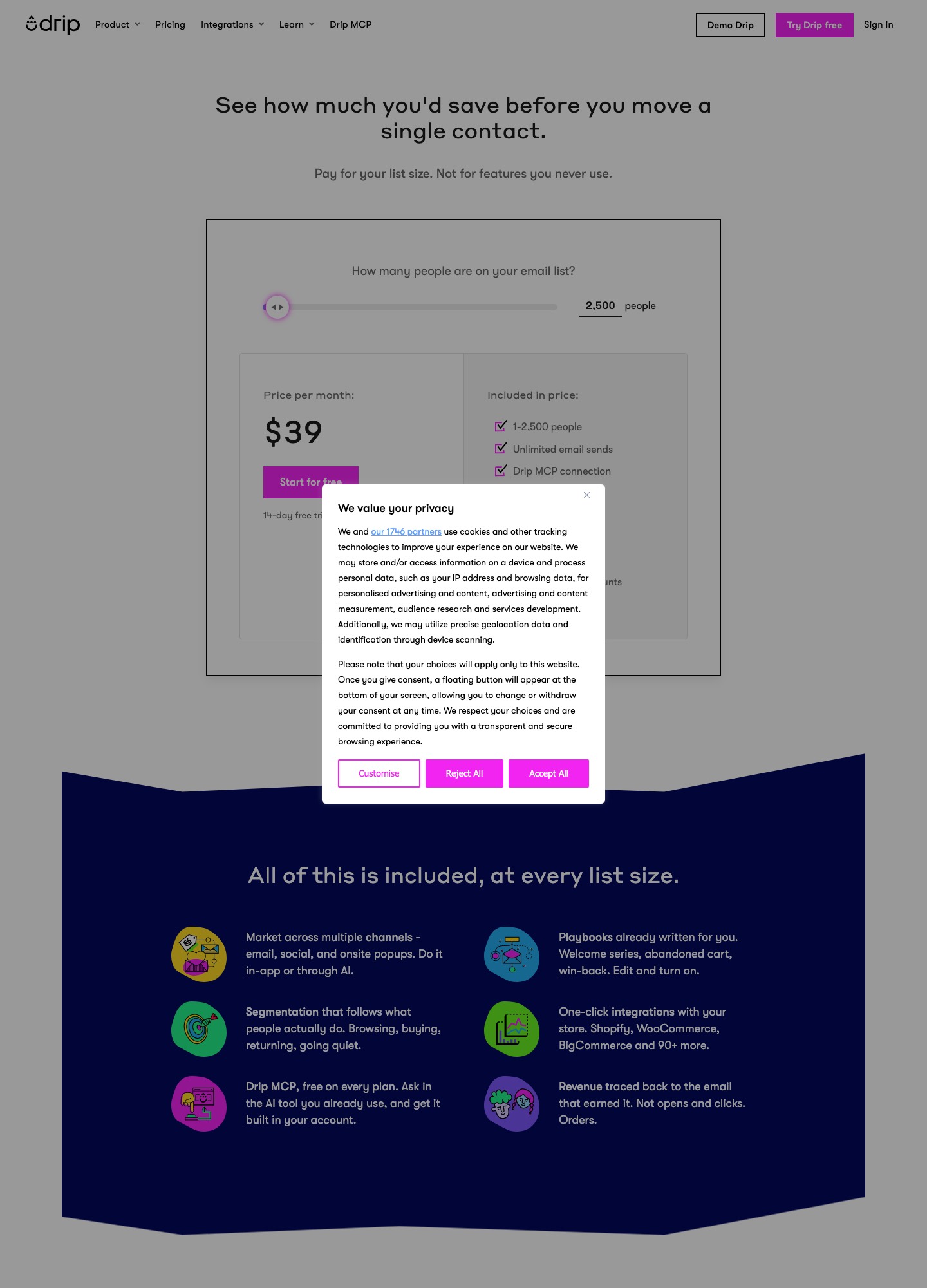
Drip prices one plan by the number of active people and the email volume you send. Every tier lists dynamic segments, onsite campaigns, up to 50 workflows, open API access and the Drip MCP connection. A 14-day free trial needs no card. At the 25,000-person tier the page adds free migration and personalized onboarding.
Costed examples at four list sizes
| List size | Customer.io Essentials | Drip | Cheaper |
|---|---|---|---|
| 5,000 | $100 | $89 | Drip |
| 10,000 | $145 | $154 | Customer.io |
| 20,000 | $235 | $289 | Customer.io |
| 50,000 | $505 or more; page points to Premium | $699, with 600,000 sends; demo button | Customer.io on list price |
Three cautions keep these numbers honest. First, Customer.io counts profiles, and a profile that existed at any point in the billing month counts toward the bill even if you delete it, so clean-ups reduce next month's bill, not this one. Second, Drip counts active people, which is a different unit from a subscriber list. Third, the 50,000 row is a floor on Customer.io's side: the page shows $505+ and nudges accounts of that size toward Premium at a similar price.
The Customer.io column follows a simple rule: above the 5,000 profiles that Essentials includes, each extra profile adds $0.009, which is $9 per extra 1,000. That is how $100 becomes $145 at 10,000 profiles (5,000 extra profiles, $45) and $235 at 20,000. Email volume works the same way: 1 million emails a month are included, and each extra 1,000 costs $0.12. A team at 10,000 profiles sending 1.5 million emails a month would add 500 blocks of 1,000 emails, $60, for a total of $205 before any other add-on. Drip's page instead shows tiers where sends rise with the list: unlimited at the lower tiers, then 480,000 sends at 40,000 people and 600,000 at 50,000, which is 12 emails per person per month in both cases.
For a small store the cheapest honest plan is Drip at 2,500 people for $39, or $49 at 3,000. For a SaaS company with an early-stage funding profile, Customer.io's Startup Program is worth checking first, because a year free changes the comparison entirely for the right applicant.
Feature comparison from the pricing pages
| Feature | Customer.io | Drip |
|---|---|---|
| Pricing unit | Profiles (people plus objects) and email volume | Active people and monthly email volume |
| Channels listed | Email, unlimited push and in-app, WhatsApp, LINE, webhooks, SMS at a custom volume | Email, social and onsite pop-ups |
| Store connections | Data integrations; Basic on Essentials, Premium integrations above | One-click Shopify, WooCommerce, BigCommerce and 90+ more |
| Prebuilt journeys | Visual workflow builder, send-time optimization, A/B and multivariate testing | Playbooks for welcome series, abandoned cart and win-back |
| Revenue reporting | Campaign reporting and conversion tracking | Revenue traced to the email that earned the order |
| Trial or free access | 12 months free for eligible startups under $10M raised | 14-day trial, no credit card |
Customer.io: where it wins and where it costs you
Customer.io is a messaging platform for teams that already produce clean data: sign-ups, plan changes, feature usage, invoices. It lists a visual workflow builder, email plus push and in-app messaging, native WhatsApp and LINE, and webhooks in both directions, so one journey can follow a user from an email into the product. The price of that flexibility is setup. Someone has to decide what events exist, name them consistently and send them reliably before a workflow can use them. Expect the first useful journey to take longer than on a store-connected tool.
Two details on the pricing page matter for budgeting. Managed deliverability is not part of Essentials, and Essentials caps object types at two where Premium allows ten. A team with several accounts, workspaces or subscriptions per person should map its data model to those object limits before signing.
Drip: where it wins and where it stops
Drip is built around the shop. Its pricing page says the integrations with Shopify, WooCommerce, BigCommerce and 90 more tools are one click, that playbooks for welcome series, abandoned cart and win-back are already written, and that revenue is traced back to the email that earned it, in orders rather than opens and clicks. A small store can launch an abandoned-cart flow in an afternoon because the data already exists in the store.
The limits follow from that focus. The channels listed are email, social and onsite pop-ups, with no push or in-app. If your triggers are product usage rather than purchases, you will be building around the tool instead of with it. Pricing moves in steady steps with list size and tops out where the slider turns into a demo request at 50,000 people.
How they handle four common nurture jobs
Trial conversion for a software product
Customer.io is the closer fit: send an event when a trial user finishes setup, branch on whether they invited a teammate, and send an in-app message to those who stall. Drip can email a trial segment, but there is no product-usage playbook on its pricing page.
Abandoned cart
Drip names abandoned cart as one of its ready-made playbooks and connects to the store in one click. On Customer.io you can build the same flow, but you must send the cart events yourself and keep that integration running.
Welcome series
Both can do it. On Drip it is a playbook you edit and switch on. On Customer.io it is a workflow you build, with the upside that you can condition the second email on what the person did in the product after the first.
Win-back
For a store, Drip's win-back playbook starts from purchase history. For a product, Customer.io can trigger from a drop in activity, then continue by push or in-app message as well as email.
What the first two weeks look like on each
Customer.io. Start on paper, not in the tool. List the five to eight events that matter (signed up, finished setup, invited a teammate, hit a usage limit, canceled) and the attributes that go with them. Send those through one of its data integrations or its API, check that profiles fill in correctly, then build segments and a first workflow in the visual builder. Because managed deliverability is not part of Essentials, authenticate your sending domain yourself and warm it up before the first large send. Test with an internal profile before you let real users into any workflow.
Drip. Start with the store connection. Install the integration for Shopify, WooCommerce or BigCommerce, let the catalog and order history sync, and confirm that a test order appears on the person's record. Then switch on the welcome, abandoned-cart and win-back playbooks one at a time, edit the copy, and look at the revenue report after a few weeks of orders. Add an onsite campaign to grow the list only after the cart flow is running, so you measure one change at a time.
Migration notes
Drip to Customer.io. Order history and catalog sync will not follow you. Decide which purchase events you still need, send them through the integration or API, and rebuild each playbook as a workflow. Export people with their tags and custom fields, and map tags to attributes or segments before importing.
Customer.io to Drip. Connect the store first and let the catalog and orders sync, then recreate journeys from the playbook that is closest to each. Product-event logic does not transfer, so decide which usage signals you can drop. At the 25,000-person tier Drip lists free migration and personalized onboarding, which is worth asking about when the list is large.
Our recommendation
For a software company with engineering time, pick Customer.io. It costs less than Drip from 10,000 profiles up, and it is the only one of the two that lists push, in-app and WhatsApp messaging. Apply to its Startup Program first if you have raised under $10M. Put one engineer on event naming before you build the first journey.
For an online store, pick Drip. It is cheaper at 5,000 people, connects to the store without a developer, and measures revenue from orders. The reason to look elsewhere is a need for channels beyond email, or product-usage triggers.
Keep exploring: all comparisons · Customer.io alternatives · Drip alternatives · Klaviyo vs Drip · behavioral triggers · ecommerce nurturing
Frequently asked questions
Is Customer.io or Drip cheaper?
It depends on list size. At 5,000 people Drip shows $89 a month and Customer.io Essentials shows $100. At 10,000 the order flips to $154 for Drip and $145 for Customer.io, and the gap widens by 20,000 ($289 against $235). Customer.io counts profiles, which include objects as well as people, so a product with many accounts or workspaces can reach the next band sooner than its subscriber count suggests.
Can Drip work for a SaaS product?
It can send to a list and react to events, but its pricing page frames the product around online stores: one-click Shopify, WooCommerce and BigCommerce connections, welcome, abandoned-cart and win-back playbooks, and revenue traced back to orders. A SaaS team that wants to branch on product usage will find Customer.io closer to that job.
Does Customer.io have a free plan?
No ongoing free plan is listed. Its pricing page offers a Startup Program that gives eligible companies that raised under $10M 12 months free. Drip offers a 14-day free trial without a credit card.
Which one sends SMS and push?
Customer.io lists email, unlimited push and in-app messages, native WhatsApp and LINE, and SMS at a custom send volume. Drip describes email, social and onsite pop-ups on its pricing page.
What does it take to move between them?
Moving into Customer.io means sending it your events and attributes through its integrations or API before any workflow can fire. Moving into Drip means connecting the store and letting the catalog and order history sync. Budget more time for the first than the second.