GetResponse vs Mailchimp: All-in-One Email Marketing Compared
Pick GetResponse if you want webinars, sales funnels or abandoned-cart recovery in the same tool: cart recovery starts on its $59 Marketer plan and webinars on its $69 Creator plan. Pick Mailchimp if you want to start on a free plan (250 contacts, 500 sends a month) or you rely on its integrations. For heavier B2B lead nurturing, HubSpot or ActiveCampaign fit better than either. Prices are for a 1,000-person list on GetResponse, as of 7 Oct 2026.
TL;DR
GetResponse and Mailchimp are both all-in-one email marketing platforms that combine email automation with landing pages, forms, and basic CRM features, but they take different approaches to feature depth vs accessibility. GetResponse is the feature-per-plan play. Its Starter plan is $19/mo for a 1,000-person list ($15.58/mo billed annually) and has unlimited monthly sends, a welcome series and a single automation workflow; unlimited workflows, abandoned-cart recovery and sales funnels arrive on Marketer at $59/mo, and webinars, a website builder and a course creator on Creator at $69/mo. Mailchimp is the familiarity play: it has a free plan for up to 250 contacts and 500 sends a month, Standard starts at $20/mo at 500 contacts, and its pricing page lists integrations such as Shopify, WooCommerce, Salesforce, Zapier and WordPress. The two plans are not priced at the same list size, so compare them at your own contact count on the vendors' pricing pages linked below.
Quick recommendation: Choose GetResponse when funnels, cart recovery or webinars decide the purchase; choose Mailchimp when you want a free starting point and a wide integration list.
Quick Verdict: When to Choose Each Platform
Choose GetResponse if:
- ✓ You want built-in webinar hosting (Creator plan, $69/mo)
- ✓ You need sales funnels or abandoned-cart recovery (Marketer plan, $59/mo)
- ✓ You want unlimited automation workflows rather than one
- ✓ You want AI content generators included on every plan
- ✓ You want a course creator or website builder in the same account
- ✓ You will pay up to $19/mo for a small list and can live without a free plan
Choose Mailchimp if:
- ✓ You want a familiar, easy-to-use interface
- ✓ You want a free plan (250 contacts, 500 sends a month) to start on
- ✓ You need connections to Shopify, WooCommerce, Salesforce, Zapier or WordPress
- ✓ You are a beginner or solopreneur
- ✓ You want a 14-day Standard trial before paying $20/mo
- ✓ You prefer simplicity over advanced features
For SaaS and subscription businesses: Confirm that either general-purpose platform can represent your product events, billing state, consent and suppression rules before adopting it for lifecycle work. Product-event tools such as Customer.io or Loops are built around that job.
What Are Email Nurturing Tools and Why They Matter
Email nurturing tools are marketing automation platforms designed to build relationships with prospects and customers through personalized, triggered email sequences. Unlike one-time broadcast emails, nurturing campaigns deliver strategic content over time based on user behavior and lifecycle stage. For small businesses, these tools are essential because they enable automated follow-up, lead qualification, and customer engagement without requiring a large marketing team.
Both GetResponse and Mailchimp are all-in-one platforms that go beyond basic email marketing to include landing pages, forms, basic automation, and simple CRM features. This all-in-one approach is attractive for small businesses that want multiple marketing tools in one platform rather than managing separate subscriptions. However, they differ significantly in feature depth—GetResponse packs more advanced capabilities into its platform, while Mailchimp prioritizes accessibility and familiarity.
Feature Comparison: GetResponse vs Mailchimp
| Feature | GetResponse | Mailchimp |
|---|---|---|
| Free plan | None; free trial on paid plans | Yes: 250 contacts, 500 sends/month |
| Entry paid price | Starter $19/mo at 1,000 contacts ($15.58/mo billed annually) | Standard from $20/mo at 500 contacts |
| Webinars | Included from Creator ($69/mo) | Not listed on its pricing page |
| Sales funnels and cart recovery | From Marketer ($59/mo) | E-commerce integrations (Shopify, WooCommerce) |
| Automation | 1 workflow on Starter; unlimited from Marketer | Marketing automation; the cheaper Essentials plan limits flows to 4 steps |
| Landing Pages | Yes | Yes |
| Integrations named by the vendor | Google Analytics | Shopify, WooCommerce, Canva, Zapier, Square, Wix, Salesforce, WordPress |
| Best For | Feature seekers | Simplicity seekers |
GetResponse vs Mailchimp Pricing (as of 7 Oct 2026)
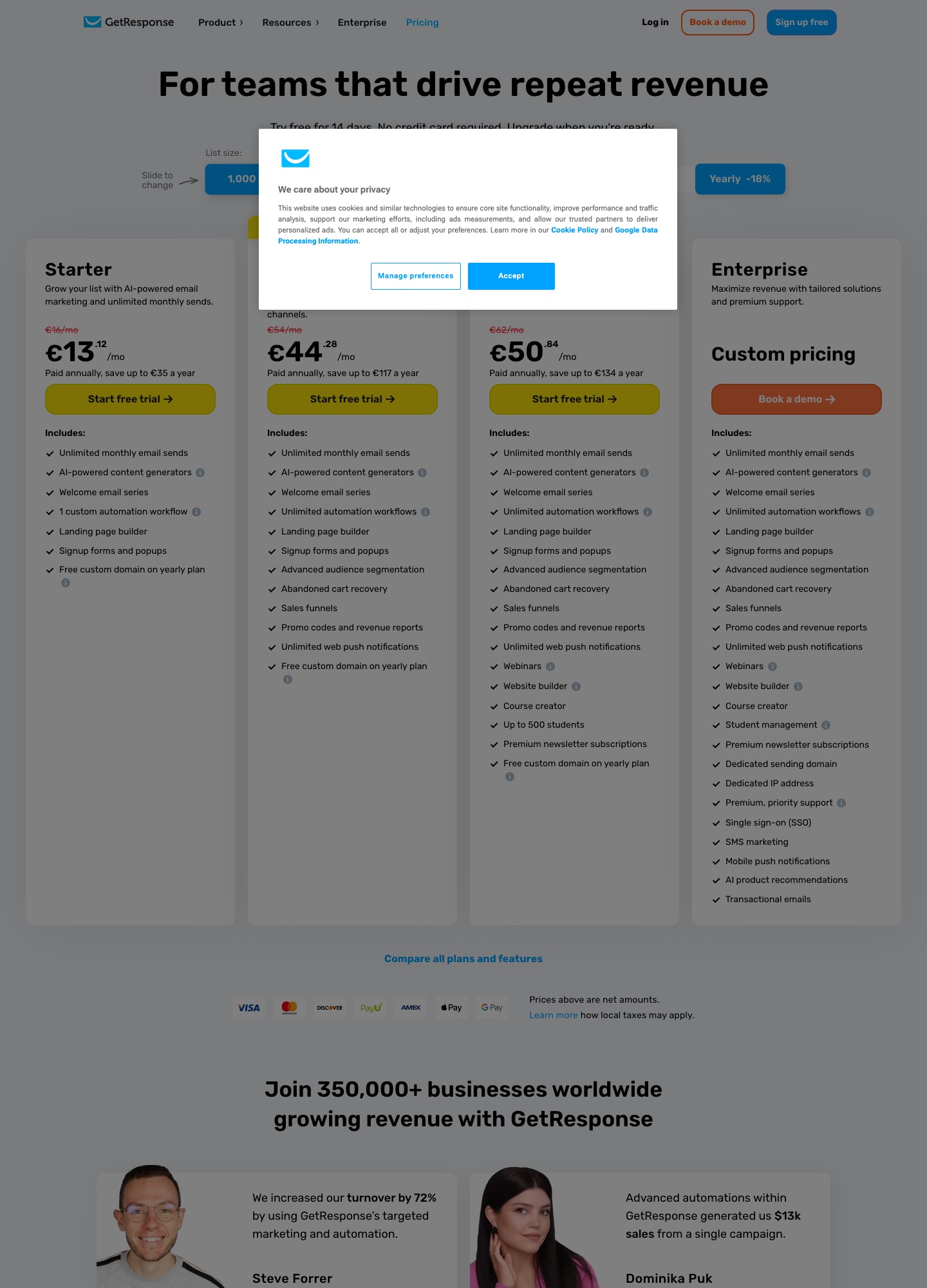
GetResponse's pricing page prices by list size and shows plans for a 1,000-person list by default. Starter is $19/mo ($15.58/mo billed annually, saving up to $41 a year) with unlimited monthly sends, a welcome series, one automation workflow, landing pages and signup forms. Marketer is $59/mo ($48.38/mo annually) and adds unlimited workflows, advanced segmentation, abandoned-cart recovery and sales funnels. Creator is $69/mo ($56.58/mo annually) and adds webinars, a website builder, a course creator for up to 500 students and premium newsletter subscriptions. There is no ongoing free plan, only a free trial.
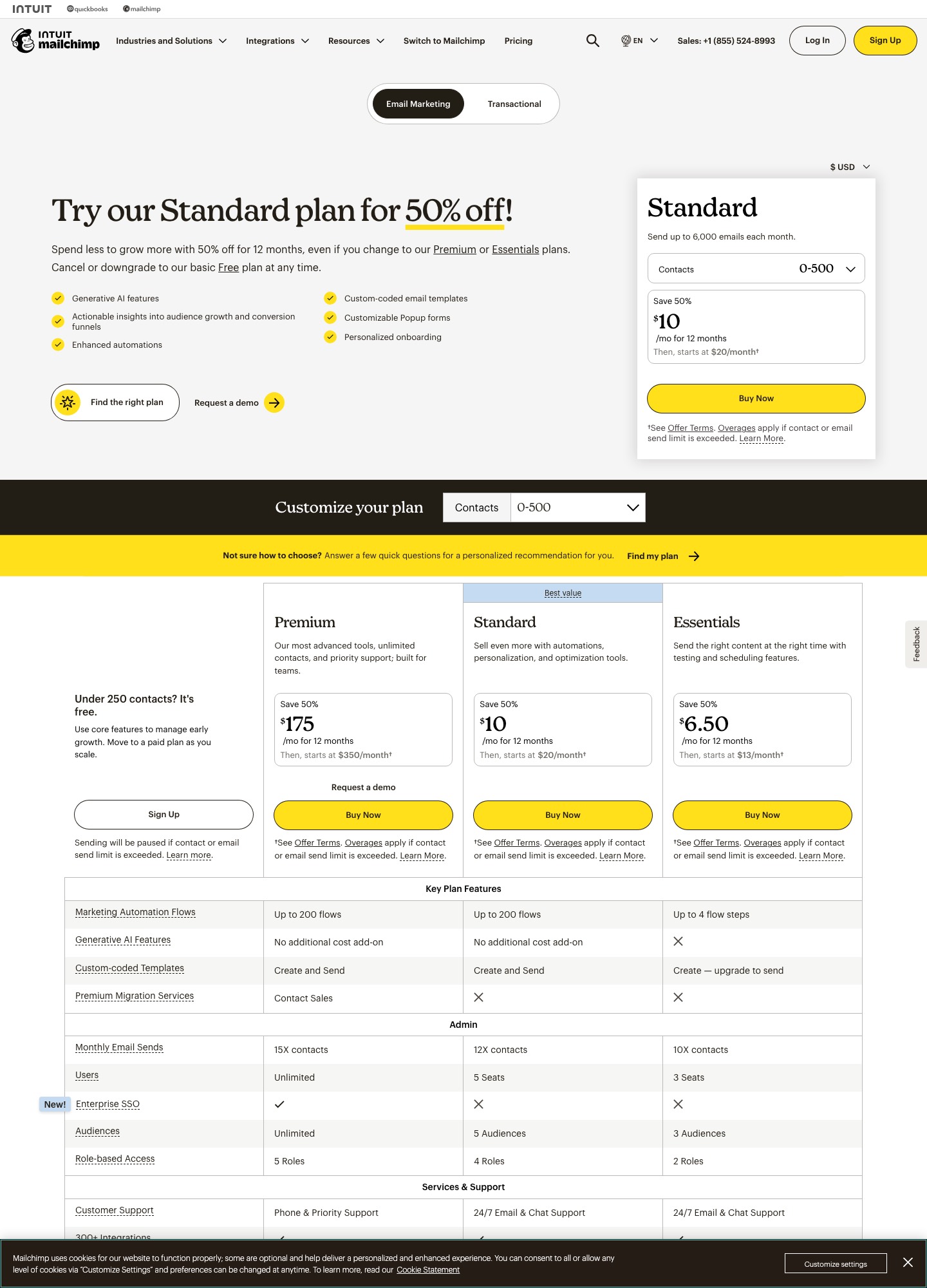
Mailchimp's pricing page prices by contacts. The Free plan covers one audience, up to 250 contacts and 500 sends a month (250 a day). Standard starts at $20/mo at its default 500-contact selector and includes up to 6,000 emails a month at that level; larger lists move up the contact selector, and the biggest contact tiers are custom-priced. A cheaper Essentials plan also exists, with fewer seats, audiences and flow steps than Standard, so look at what it omits before choosing it for automation work.
Which plan fits which scenario
- A small newsletter list under 250 contacts and 500 sends a month: Mailchimp's free plan costs nothing, whereas GetResponse starts at $19/mo.
- A 1,000-person list that needs cart recovery or a sales funnel: GetResponse Marketer at $59/mo ($48.38/mo billed annually) includes both. On Mailchimp, read Standard's price at your own contact count on its pricing page and compare it with that figure.
- A coach or consultant running regular webinars: GetResponse Creator at $69/mo ($56.58/mo annually) includes webinars, so there is no separate webinar subscription; with Mailchimp you would add and integrate a separate webinar service.
- A store on Shopify or WooCommerce that wants familiar tooling: Mailchimp lists both integrations; GetResponse's Marketer plan lists abandoned-cart recovery, so test both with your store before committing.
GetResponse: Feature-Rich Marketing Platform
GetResponse is an all-in-one marketing platform that bundles more than email into its plans. Beyond standard email marketing and automation, its higher plans include webinar hosting (Creator), sales funnels and abandoned-cart recovery (Marketer), unlimited automation workflows (Marketer), and AI-powered content generators on every plan. It suits small businesses who want these capabilities in one account. The entry plan is $19/mo at a 1,000-person list, but the entry plan is limited: it has one automation workflow, so most nurturing builds will need Marketer.
GetResponse Strengths
- Built-in Webinar Hosting: This is GetResponse's standout differentiator, but it sits on the Creator plan ($69/mo at a 1,000-person list), not the entry plan. Running webinars inside the same account as your email list means registrants can be added to sequences and follow-ups can be sent without a connector between two tools. For coaches, consultants, and B2B companies who use webinars for lead generation, this feature alone can justify choosing GetResponse.
- Conversion Funnels: GetResponse's pricing page lists sales funnels from the Marketer plan ($59/mo at a 1,000-person list), alongside a landing page builder and signup forms and popups on every plan. For businesses running lead magnets, free trials, or product launches, that keeps landing pages, forms and follow-up emails in one account rather than stitching a funnel together from separate tools.
- Advanced Automation: The Starter plan is limited to one custom automation workflow, while Marketer and Creator list unlimited workflows and advanced audience segmentation. That gap matters for nurturing: a welcome series, a lead-magnet follow-up and a re-engagement flow would already be three workflows. If your nurturing is more demanding than that, with lead scoring and CRM handoff, compare it with ActiveCampaign and HubSpot as well.
- AI Content Generation: GetResponse's pricing page lists AI-powered content generators on every plan, and AI product recommendations on its Enterprise tier. They help with first drafts of copy and subject lines, which is useful for a small team, though you still need to edit the output for your own voice.
- Unlimited Sends and Annual Savings: Every GetResponse plan lists unlimited monthly email sends, so cost depends on list size and plan rather than on how often you mail. Paying annually lowers the monthly equivalent: Starter drops from $19 to $15.58, Marketer from $59 to $48.38 and Creator from $69 to $56.58, saving up to $41, $127 and $149 a year respectively.
GetResponse Is Perfect For:
- • Coaches and consultants using webinars for lead generation
- • Small businesses wanting advanced automation on a budget
- • Companies running lead magnets and free trials
- • Marketing teams comfortable learning more complex software
- • Businesses needing conversion funnels
- • Feature-conscious buyers wanting maximum value
Mailchimp: Familiar All-in-One Platform
Mailchimp is one of the most widely recognized email marketing platforms, known for accessibility and ease of use. It has been introducing small businesses to email marketing for a long time, and that familiarity is a real advantage: many marketers already know the interface, which makes onboarding fast. The platform combines email marketing, landing pages, social posting, and basic automation into one accessible package. While Mailchimp lacks some of GetResponse's advanced features, it excels at making email marketing approachable for beginners, with solid templates, intuitive workflows, and extensive documentation.
Mailchimp Strengths
- Familiarity and Ease of Use: Mailchimp's interface is familiar to a great many marketers. If you've hired someone with email marketing experience, they likely know Mailchimp. This familiarity reduces training time and means you can find answers, templates, and best practices everywhere online. The platform is designed for beginners, with intuitive workflows that don't require technical expertise.
- Massive Integration Ecosystem: Mailchimp's pricing page names Shopify, WooCommerce, Canva, Zapier, Square, Wix, Salesforce and WordPress among its integrations. If your stack already includes several of those, Mailchimp means less custom connecting work, and Zapier covers many of the rest. This makes it a practical choice for businesses who rely on multiple tools and need them to work together.
- Documentation and Community: Mailchimp's popularity means plenty of tutorials, templates and freelancers who know the product. That lowers the cost of getting help, which matters more to a small team than a long feature list it will not use.
- Free Plan and Gentle Entry Pricing: For very small businesses and solopreneurs, a free plan for up to 250 contacts and 500 sends a month (250 a day) lets you test the tool before paying. Standard then starts at $20/mo at 500 contacts, and a 14-day Standard trial is offered. The price rises with your contact selector, so model your list growth before settling, because the free plan sends only 500 emails a month.
- Solid E-commerce Integration: Mailchimp lists Shopify and WooCommerce integrations, which let you build campaigns from store data. While not as e-commerce-specialized as Drip or Klaviyo, Mailchimp's e-commerce features are solid for general online stores.
Mailchimp Is Perfect For:
- • Beginners and solopreneurs new to email marketing
- • Small businesses valuing familiarity and ease of use
- • Teams who want to get started quickly without learning complex software
- • Businesses needing extensive third-party integrations
- • Companies with limited budgets that want a free plan first
- • E-commerce stores wanting solid but not specialized automation
Which Platform Fits Your Needs?
Choose GetResponse If You Want:
- • Webinars integrated with email marketing
- • Conversion funnels for lead generation
- • More advanced automation capabilities
- • Abandoned-cart recovery and sales funnels on the same plan (Marketer)
- • AI assistance with content creation
- • Unlimited monthly sends on every plan
- • Willingness to learn more complex software
Choose Mailchimp If You Want:
- • Familiar interface and easy onboarding
- • A free plan to start on
- • Extensive third-party integrations
- • A tool many freelancers and agencies already know
- • Simple workflows for beginners
- • Solid e-commerce features
- • Fast setup without technical learning curve
Our Recommendation: Choose Based on Priorities
For small businesses that need webinars, funnels or cart recovery in one account, GetResponse is the better fit, provided you budget for the Marketer ($59/mo) or Creator ($69/mo) plan rather than the $19/mo Starter, which has one automation workflow. If you are willing to learn a more complex interface in exchange for those features, GetResponse is the stronger choice.
For beginners and solopreneurs who prioritize familiarity, ease of use and a free plan, Mailchimp remains the safe bet. The interface is approachable, the integration list is long, and you can be up and running quickly. You may outgrow its automation on cheaper plans, and Standard is $20/mo at 500 contacts before your list grows, but it is a sensible starting point.
For SaaS and subscription businesses, compare the event, billing, identity and suppression work required to make either general-purpose platform reliable before treating the shortlist as a lifecycle solution. Event-driven tools such as Customer.io and Loops are covered in our product-led growth guide, and B2B teams that need lead scoring and a CRM should look at ActiveCampaign vs HubSpot.