Sequenzy vs HubSpot: A CRM Suite Against a Lifecycle Email Tool
HubSpot Marketing Hub is a marketing suite that sits on a CRM and is priced in tiers. Sequenzy is an email platform priced by how many emails you send, built around billing and product events. They overlap on automated email, and not much else.
By Owen Hargrove · Updated 7 Oct 2026
About the prices on this page
All prices on this page are copied from each company's own pricing page (Sequenzy, HubSpot) as they stood on 7 October 2026. HubSpot wins several of the comparisons below, and the verdict says which readers should pick it.
Quick verdict
Pick HubSpot if marketing and sales share one contact database, reps work deals inside it, and your nurturing should react to lifecycle stage and deal activity. For a B2B marketing team that lives in a CRM, this is frequently the right answer and Sequenzy is the wrong shape of tool.
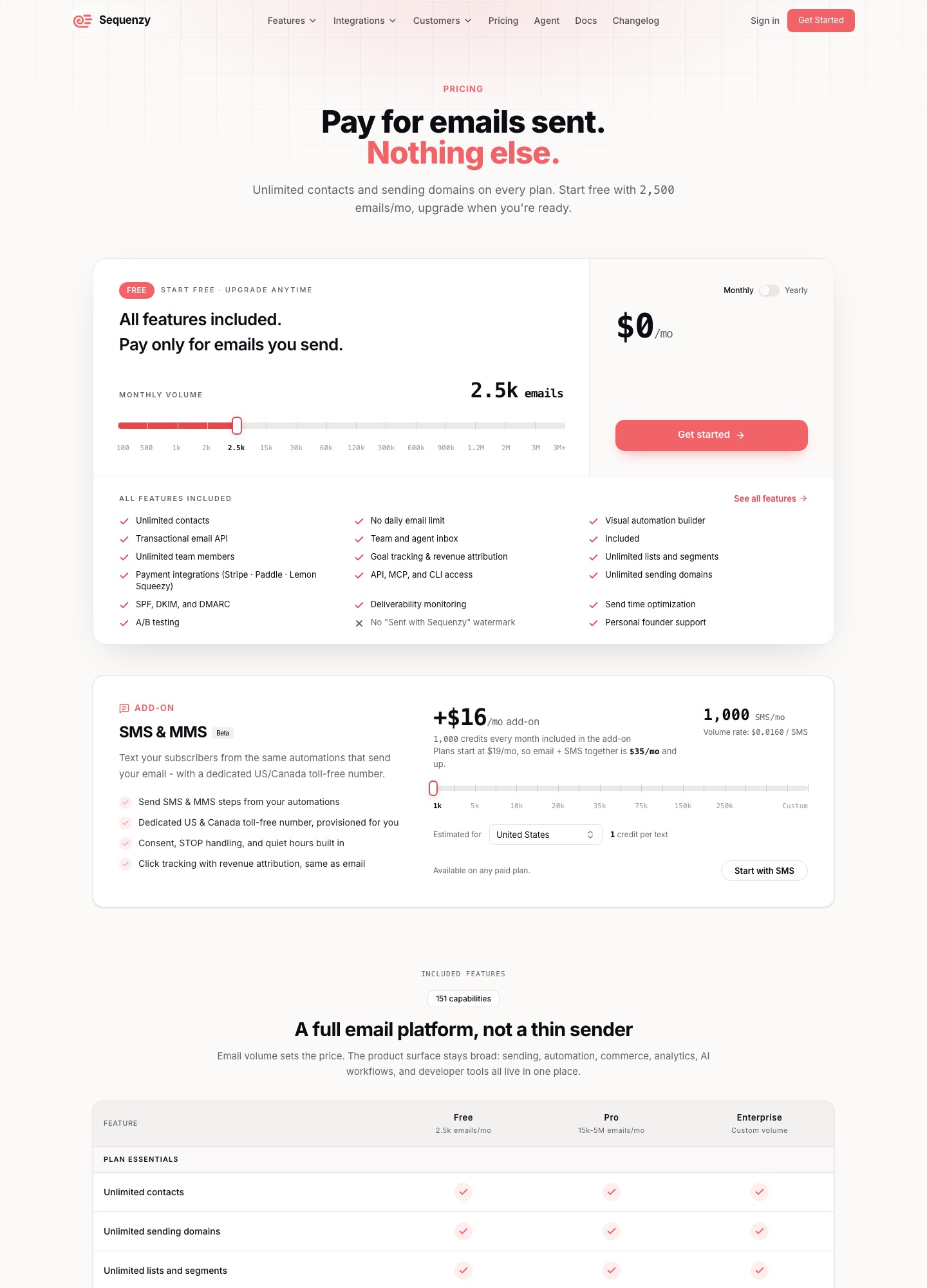
Pick Sequenzy if you sell a self-serve subscription billed through Stripe, Paddle or Lemon Squeezy, your list is large relative to how often you mail it, and the emails you need are trial, onboarding and payment follow-ups. You pay for sends, not for stored contacts.
Three teams, three different answers
A B2B marketing team with six marketers and twelve reps
Leads arrive from content, events and ads. Reps log calls, create deals and expect marketing to stop mailing a prospect the day a meeting is booked. This team needs a shared CRM first and email second. HubSpot's Free plan already lists unified contacts, companies and deals, and the paid tiers add automation on top of those records. Sequenzy's published features do not mention a deal pipeline, so it would be a side tool here at best. Choose HubSpot.
A founder-run SaaS on Stripe with 12,000 trial users
Nobody here works a pipeline. Customers sign up, start a trial, add a card and sometimes see a payment fail. The emails are billing-driven, and the contact list is large because trials are free. Sequenzy matches that shape: contacts are unlimited, its integrations include Stripe, Paddle and Lemon Squeezy, and the free plan covers 2,500 emails a month with every feature on. HubSpot would work but charges for a CRM this team does not use. Choose Sequenzy.
A sales-assisted SaaS with a free trial and four account executives
This is the hard case. High-value leads belong in a CRM with rep ownership; small self-serve accounts belong in a billing-driven lifecycle. Many teams here keep HubSpot as the system of record and add Sequenzy only for post-signup email, or stay in HubSpot alone and accept more manual setup for billing events. If the reps outnumber the self-serve revenue, stay in HubSpot; if self-serve dominates, start with Sequenzy and connect the CRM later. Either, split by who owns the contact.
HubSpot's automation tiers are the real price gate
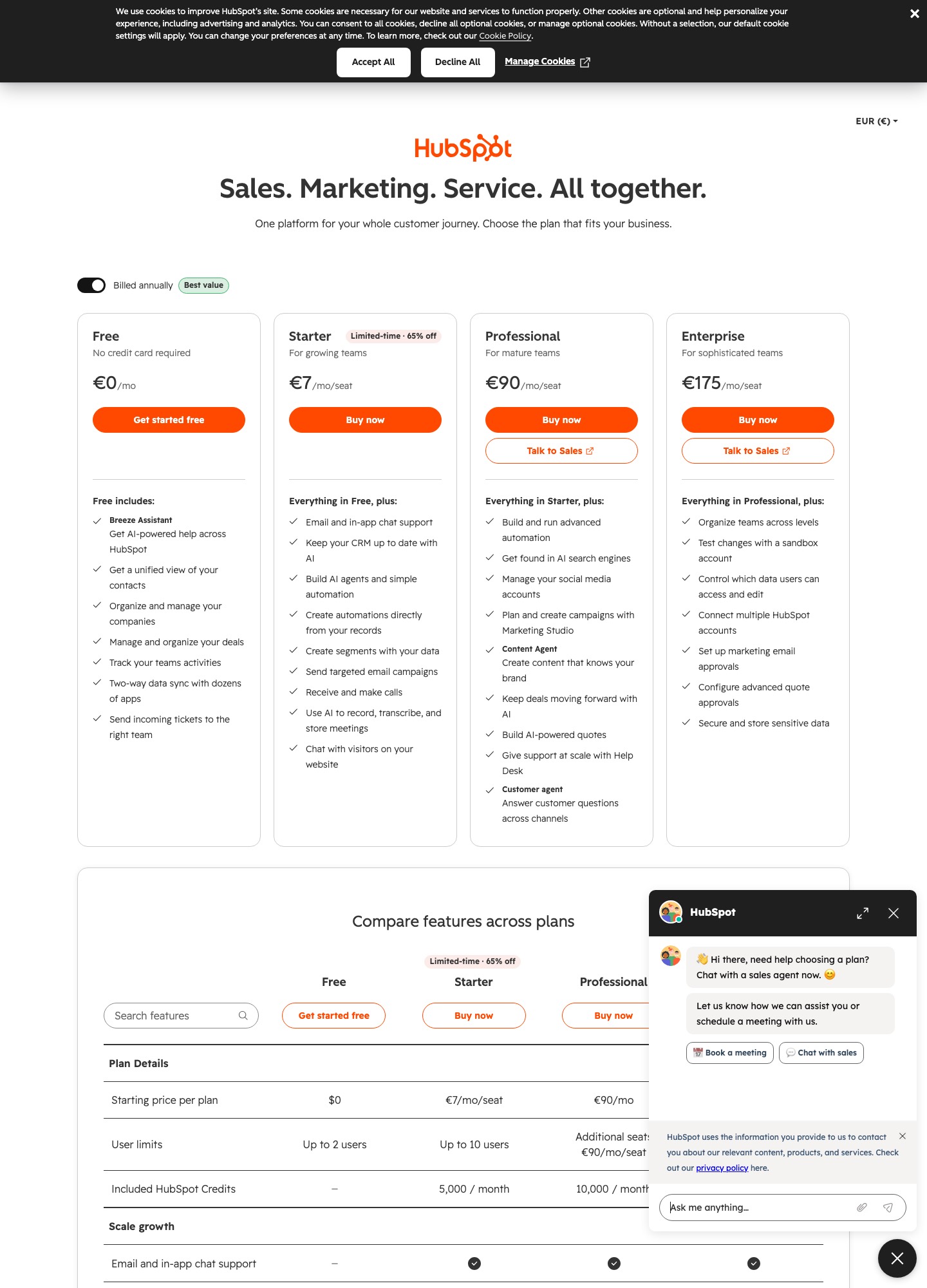
The headline numbers on HubSpot's Marketing Hub page are Starter $7, Professional $800 and Enterprise $3,600 a month, with free tools below them. What separates those tiers for nurturing is automation. The pricing page's feature table lists email automation as one automated action on Free, up to 10 automated actions on Starter, and unlimited actions on Professional and Enterprise, with omni-channel marketing automation starting at Professional.
Ten actions go a short way. A welcome email, a wait, a branch on whether the contact clicked, a second email and a task for a rep is already five. A three-branch trial flow with reminders can exceed ten actions, which is how a team on Starter ends up pricing Professional. At that tier the page describes up to 300 workflows for 10 teams. Enterprise raises that to up to 1,000 workflows for 300 teams and adds behavioral events, predictive lead scoring and workflow health monitoring.
Sequenzy has no such steps. Its pricing page says all features are included on Free, with price rising only through its email volume tiers. That does not make Sequenzy's automation deeper than HubSpot Enterprise's; it means you never pay a tier jump to unlock a branch. If you want lead scoring on this site's terms, our lead scoring guide covers what to build before choosing a tier.
Cost at three list sizes
Sequenzy's meter is emails sent; HubSpot's pricing page shows tier prices that depend on the automation depth you need, plus seats and marketing contacts. I only quote HubSpot's starting price for each tier because the page's contact selector is what sets the real number, so treat the right column as a floor, not a total.
| Scenario | Sequenzy (emails sent) | HubSpot Marketing Hub (starting price of the tier you would need) |
|---|---|---|
| 3,000 contacts, 4 emails a month = 12,000 emails, flows of 10 actions or fewer | $19 a month (15,000-email step) | Starter at $7 a month, which lists up to 10 automated actions |
| 20,000 contacts, 3 emails a month = 60,000 emails, branching flows over 10 actions | $49 a month (60,000-email step) | Professional at $800 a month, unlimited automation actions |
| 40,000 contacts, 3 emails a month = 120,000 emails, behavioral events and predictive lead scoring | $99 a month (120,000-email step) | Enterprise at $3,600 a month, with behavioral events and predictive lead scoring |
Read the first row honestly: if HubSpot's $7 Starter price applies to your contact count and ten actions are enough, HubSpot is the cheaper line, and you also get its CRM. Sequenzy's cost advantage begins in the second row, where HubSpot's $800 Professional tier is what unlocks unlimited actions. On Sequenzy's side, annual billing is listed at $205, $313, $529 and $1069 for the $19, $29, $49 and $99 steps; HubSpot's page lists per-seat pricing, so the number of people editing campaigns affects the real bill.
The comparison also leaves out what HubSpot includes beyond email. Its Free tools include a CRM, and paid tiers add social publishing, campaign planning and help desk tools according to the plan cards. If you would otherwise buy those separately, the real comparison is HubSpot against Sequenzy plus other tools. Past 120,000 emails a month, Sequenzy's slider continues; read the price there.
What HubSpot gives you that Sequenzy does not list
- A shared CRM. The Free plan on HubSpot's page includes unified contacts, companies, deals, team activity tracking and two-way data sync with dozens of apps. That is a different category from an email tool that integrates with a CRM.
- Automation that runs off CRM records. Starter lists creating automations directly from your records and building simple automation, and Professional adds advanced automation. When a rep changes a deal stage, the nurture program can react without a connector in between.
- Marketing tools around the email. Professional's plan card lists social media account management, campaign planning with Marketing Studio and a content agent, and Enterprise adds marketing email approvals, teams and a sandbox account for testing changes.
- Governance. HubSpot publishes a data processing agreement, and Enterprise lists access controls over who can see which data. I found no hosting region or data processing agreement stated on Sequenzy's pricing page, so a company with a procurement checklist should ask Sequenzy directly.
What Sequenzy gives you that HubSpot's pricing page does not
- Billing-system connections. Sequenzy's pricing page names Stripe, Paddle and Lemon Squeezy, plus Polar, Creem, Dodo Payments and PostHog, and its Stripe integration supports segmenting by MRR and LTV.
- A ready failed-payment flow. A Stripe
invoice.payment_failedevent starts a dunning email flow with a card-update page, per Sequenzy's homepage. It is email only; Stripe or Paddle still decides how and when to retry the charge, and this page claims no recovery rate for it. - No per-contact meter. A trial list of 40,000 people costs nothing extra to store.
- One platform for marketing and transactional mail. Sequenzy describes both on one API with one bill, and lists API, MCP and CLI access on every plan, which suits a developer-run team.
- AI-generated sequence drafts. Its pricing table lists AI-generated email sequences on every plan. HubSpot's page lists an AI assistant and AI agents; I would not call either tool's AI the deciding factor.
Running both without double-mailing
Teams that combine them usually draw the line at the moment of signup. HubSpot owns anonymous visitors, leads and anyone a rep is working. Sequenzy owns people with an account: trial users, paying customers and lapsed subscribers. The hand-off needs one field, such as "has product account", written from your app or through Zapier or a custom webhook into HubSpot, and a suppression rule on the HubSpot side so that nurture emails stop once a lead becomes a trial user.
The failure to avoid is two tools mailing the same person with overlapping onboarding advice. Decide before building who sends the welcome email, who sends the first pricing email and who owns the unsubscribe record, and write the rule into both tools. If you are still choosing a marketing suite, our HubSpot vs Marketo comparison and the HubSpot alternatives page cover the suite end of the market.
Questions that settle it before you pay
Before buying HubSpot Professional
- • Do your flows really exceed 10 automated actions, the Starter ceiling on the pricing page?
- • Will more than two people use the Free tier, or more than ten use Starter? Those are the user limits shown in the feature table.
- • Do reps need to see email engagement on the deal record, or is a weekly report enough?
- • Can you name the marketing operations owner who will maintain properties, scoring and workflows?
Before committing to Sequenzy
- • Does your billing run through Stripe, Paddle, Lemon Squeezy or one of the other providers on its pricing page?
- • Will you send more than 120,000 emails a month, where you would price from the slider instead of the steps above?
- • Does any team need deal stages, task assignment or a sales pipeline view beside the emails?
- • Does your security review require a stated hosting region or a data processing agreement before you sign?
Two yes answers on one side usually decide it. If the answers split evenly, you are in the third-team case above, and the question becomes which tool should own the contact record while the other reads from it.
Setup effort, without made-up timelines
HubSpot's setup work is data modeling: contact and company properties, lifecycle stages, who owns a lead, scoring rules, and the workflows that move people between them. The work is front-loaded and mostly done by whoever runs marketing operations; the benefit is that sales and marketing then share definitions. Sequenzy's setup is connection work: link the billing provider, send product events, then write or generate the sequences for trial, onboarding and billing failures.
Neither vendor publishes how long this takes, and this page does not guess. A fair test is to build one real flow in each trial or free plan, such as "trial started, day-3 nudge, trial ending, card failed", and count how many settings you touched. The email tools for marketing teams page lists other suites worth testing in the same way.
Verdict
For B2B marketing teams whose work revolves around a CRM, HubSpot is the better fit and often the only sensible one, even though its automation depth is gated behind a tier that costs $800 a month for Professional. The CRM, the shared lead and deal records and the marketing tools are what you are buying. Starter at $7 can be enough for a small team with simple flows, and the Free tier is a legitimate place to start.
For a product-led SaaS billed through Stripe, Paddle or Lemon Squeezy, Sequenzy is the better match: unlimited contacts, a free 2,500 emails a month, and a failed-payment email flow ready to switch on. Choose it when no one needs a deal pipeline. If a team has both motions, start with the one that holds most revenue and add the other only once the first is stable. If your SaaS decisions run through self-serve growth, the email tools for SaaS page shows what that setup looks like across other vendors.
Frequently asked questions
Is HubSpot overkill for a small SaaS?
Often, yes, if the whole job is trial and billing email. HubSpot's value is the CRM and marketing tools around the email, and a founder-run product on Stripe may use almost none of that. If you also have salespeople closing deals from the same contact records, the CRM stops being overkill and starts being the reason to choose it.
What does HubSpot limit on its lower tiers?
HubSpot's pricing page lists email automation as one automated action on Free, up to 10 automated actions on Starter, and unlimited actions on Professional and Enterprise. Omni-channel automation is described as up to 300 workflows for 10 teams on Professional and up to 1,000 workflows for 300 teams on Enterprise, with behavioral events and predictive lead scoring on the top tier.
How is Sequenzy priced compared with HubSpot?
Sequenzy prices by emails sent per month with unlimited contacts: free for 2,500, then $19 for 15,000, $29 for 30,000, $49 for 60,000 and $99 for 120,000. HubSpot Marketing Hub lists Starter at $7, Professional at $800 and Enterprise at $3,600 a month, with free tools below that. These are different meters, so compare them against the automation depth you need rather than as like-for-like prices.
Can I run Sequenzy and HubSpot together?
Yes. A common split is HubSpot for lead capture, sales handoff and CRM-driven nurture, and Sequenzy for the lifecycle after someone signs up: trial emails, onboarding and payment follow-up. Sequenzy lists Zapier and custom webhooks among its integrations, which gives you a way to pass a lifecycle field between the two. Add a suppression rule so a contact is never mailed by both for the same purpose.
Does Sequenzy send failed-payment emails like a billing tool?
Sequenzy's homepage says a Stripe invoice.payment_failed event starts a dunning email flow with a card-update page. It covers email only. Retry logic for the charge belongs to Stripe or Paddle, and HubSpot has no equivalent built-in billing connection that I can point to, so there you would pass the event in yourself.